Blog Home / Securing your wordpress site
Securing Your WordPress Site
WordPress is currently the most popular content management system used on the web. An estimated 500 million sites currently use WordPress. That makes up almost 41% of the known web. This does not count sites that may use multiple installations or that deploy WordPress in an offline environment, such as on a home/office network. The true number is probably considerably higher than this.
Because of its popularity, WordPress does draw the attention of people looking to exploit it. Thankfully, WordPress has a dedicated team who regularly produce updates to the WordPress core. This includes improvements, patches and security fixes. WordPress also operates a bounty scheme whereby ethical hackers can receive a reward for finding and demonstrating flaws within the WordPress code.
As a WordPress site administrator, there are things you should do to make sure your site remains safe and secure. The first step is to ensure that WordPress is set to receive automatic updates. By default, WordPress core will be updated automatically, and there is no way to disable this within the user interface. This can be disabled by editing your .htaccess file, but we strongly discourage anyone from doing so without a very good reason. As updates are released and not applied to your installation, your site will become less secure.
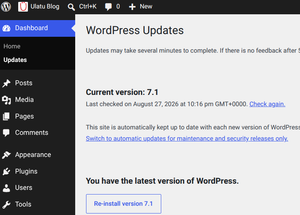
Within the WordPress admin area, you have the ability to choose what kind of updates you wish to receive. The options are
“Each new version of WordPress” or “Maintenance and security releases only”
We highly recommend you leave this set to each new version. This ensures you are always using the most up-to-date version of WordPress on your site.
Themes
Themes also need to be kept up-to-date. Outdated themes can also pose a security risk if someone has been able to identify an exploit. You should set each of your themes to automaticaly update from within the WordPress admin area.
What we often see is users will download lots of themes when they are setting up their WordPress site. They will then choose their favourite theme, but leave the rest installed. You should delete any themes you are not using. An outdated theme with potential exploits poses a serious threat to your WordPress website even if it is not activated or in use. Choose the theme you wish to use, activate it and set it to receive automatic updates (If this option is available for your theme). All other themes should be deleted.
Plugins
Plugins are also a known entry point for exploits if they have security bugs. You should only install plugins from reputable and trustworthy sources. Never install A plugin (or theme) if you do not fully trust the vendor.
Plugins are great. They let you extend the functionality of your WordPress install to do things that WordPress cannot do by default. Plugins also need to receive updates.
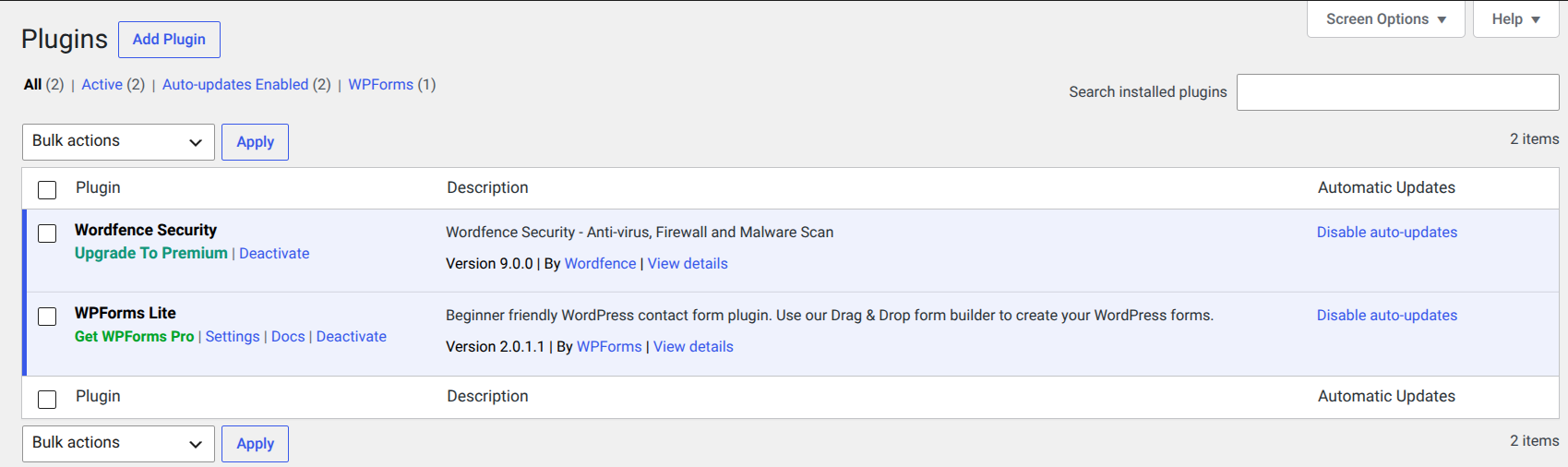
Within the “Plugins” page, you can choose to enable auto-updates. By default, most plugins have this disabled. If the option is available, you should use it. This means you do not have to manually check if updates are available and manually install them. With automatic updates enabled, updates will be downloaded and installed when they become available. This helps to keep your plugins secure.
As with themes, you should always delete any plugins you are not using. This helps reduce the target area if someone were to scan your site for exploits.
Using “Nulled” Plugins or Themes
Many themes and plugins released for WordPress are commercial, and you may need to pay a one-time fee or possibly a monthly fee to use them. You are supporting the developer if you choose to use a commercial theme. Not only do you receive the paid theme or plugin, but you may also receive some level of tech support related to the product you have paid for.
There are, however, websites that offer “nulled” or “cracked” themes and plugins that are essentially stolen versions of the work that have had the licence-required features removed. This means you can technically obtain a commercial product for free and run it on your site.
We highly discourage you from doing this. Not only is it theft, but you really have no idea what you are installing on your site. Nulled software can contain malicious code that will compromise your website. A genuinely useful piece of commercial software that you wanted to use could result in your website being compromised when you install a nulled copy. You have been warned!
WordPress is Secure
In general, WordPress is a secure piece of software that receives frequent updates to improve the product and make it more secure. If you play your part and keep your installation up to date, you will have a secure WordPress website.